

“Hi, how much is this?” Three words in a message, and a sale is either about to happen or about to vanish. For a lot of small businesses and local service hustlers, the DM inbox is the shop counter. People see a post, tap message, and ask.
The problem is that most chats drift. The price gets sent, the customer says “cool, thanks”, and that’s the end of it. This guide turns that drift into a simple DM sales machine: pick the right platform, set up the tools the apps already give you, walk every enquiry through the same steps, and finish with a payment link. It works whether you’re cutting hair in Leeds, baking in Brisbane, fixing bikes in Halifax or selling prints from Grand Cayman.
Step 1: Go Where Your Customers Already Chat
Don’t pick a platform because it’s trendy. Pick it because your buyers are already there and already message businesses on it.
Usage really does vary by audience. In Pew Research Center’s 2025 survey of US adults, 80% of those aged 18 to 29 said they use Instagram, compared with 19% of those aged 65 and over1. Facebook was more even across ages in the same survey, used by 68% of 18 to 29 year olds and 57% of those 65 and over1. That’s one country, so treat it as a reminder rather than a rule: the right channel depends on who you serve and where.
The better data is your own. Ask a few questions:
- Where do your current customers find you? Check which app your last enquiries came from.
- Where do people in your area ask for recommendations? Local groups, neighbourhood pages and community chats are worth a look.
- Where do your customers already talk to friends? If everyone you sell to lives on WhatsApp, a WhatsApp-first setup makes sense.
For local service hustlers, also think about how people book. Someone who wants a haircut or a quote for a garden tidy wants a fast answer and a time slot, so pick the app where you can reply quickly from your phone between jobs.
Start with one main channel and do it well. You can add a second when the first one is running smoothly.
Step 2: Set Up the Shop Counter Inside the App
Each platform gives business accounts tools that make DMs work like a storefront. Here’s what the official pages list.
WhatsApp: the Business app
The WhatsApp Business app is a separate app from regular WhatsApp, built for small businesses. Its official features page lists2:
- Business profile: your logo, business description, hours and website in one place.
- Greeting messages: an automatic welcome when a new customer starts a chat.
- Away messages: automatic replies outside your business hours, so people know when you’ll be back.
- Quick replies: shortcuts for messages you send often.
- Labels: a way to sort and filter conversations, so you can find the ones that need attention.
- Catalog and cart: a mobile storefront for your products or services, plus a cart so customers can pick items and send them as a single message.
- Catalog links: links to your whole catalog or to single items that you can share on WhatsApp, Facebook and Instagram.
The same page lists free ways for people to find your chat, including QR codes, short links and action buttons on your Facebook Page and Instagram profile2. Put that link or QR code everywhere your customers look.
Instagram: a professional account
To run Instagram as a business inbox, switch to a professional account. Meta’s developer documentation says Instagram messaging is available for any Instagram professional account for a business or creator3.
One detail matters for outreach. Instagram’s own page on DMs says that when you message someone who doesn’t follow you and isn’t connected to you, your message arrives as a message request and can only contain text, so photos and videos have to wait until they accept4. That’s a good reason to let customers message you first, and to make that easy with a clear “message us” line in your bio and posts.
Facebook: your Page inbox
On Facebook, your business Page is the storefront and the inbox. Meta’s Messenger Platform documentation describes a Page or Instagram professional account replying to people who message it, and notes that a person must start the conversation3. The WhatsApp Business features page also lists a “Send Message” button on your Facebook Page as a way to start chats with people who don’t follow you yet2.
Features roll out unevenly and some are limited to certain countries, so check what your own app shows before you build your process around it.
Step 3: Walk Every Enquiry Through the Same Five Moves
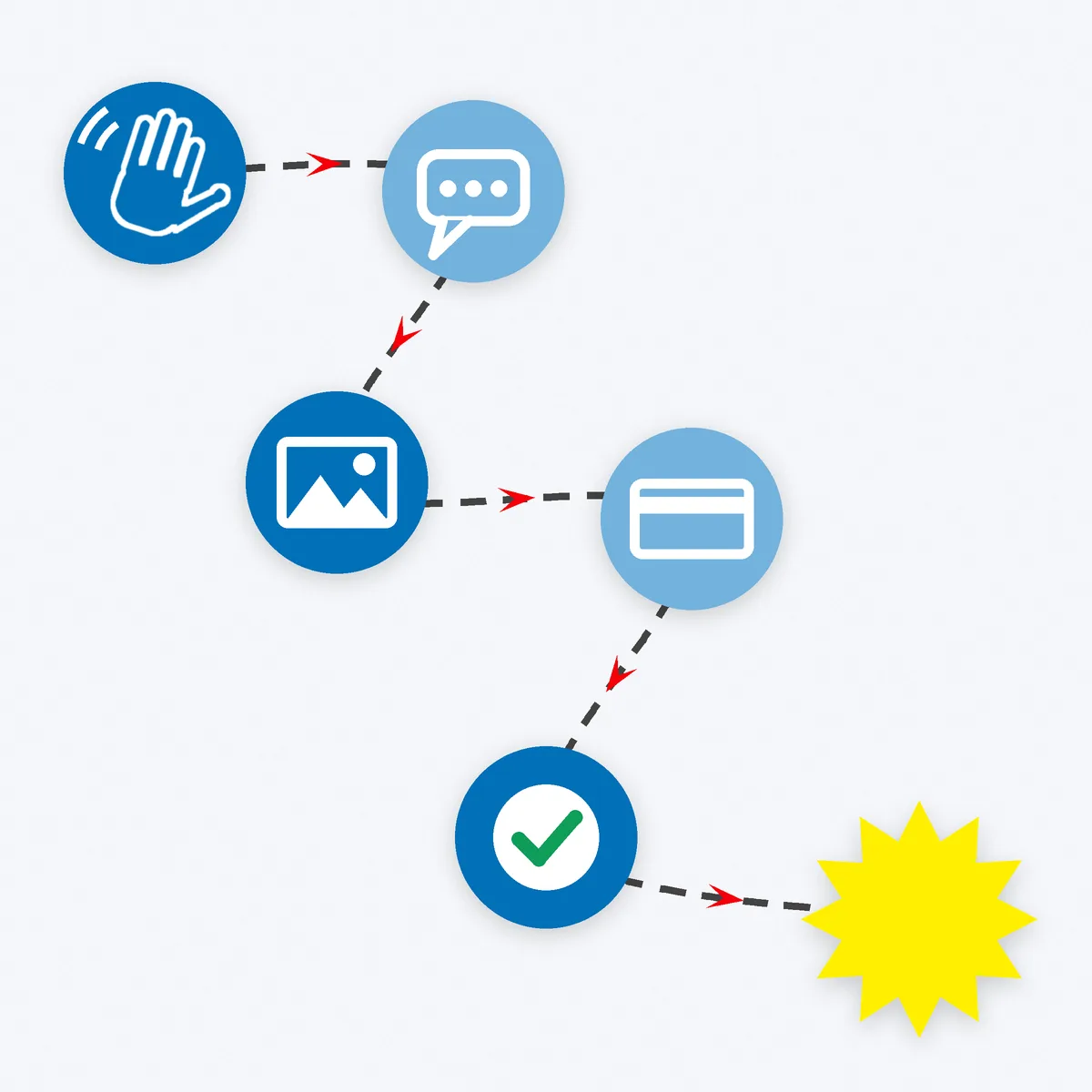
This is the machine. Every chat, every time:
1. Greet and qualify. Thank them and ask one question that moves things forward. “Thanks for reaching out! Is this for you or a gift?” or “What date did you have in mind?”
2. Answer the real question. If they asked the price, give the price, in their currency, with what’s included. Hiding prices behind “DM for price” and then making people wait is how chats die.
3. Show, don’t just tell. Send the catalog item, a photo of a recent job or a short video. On WhatsApp, a catalog link does this in one tap.
4. Make one clear offer. Summarise it in a single message: what they get, the total, when they’ll get it and how to pay. Our post on landing your first paid order from a customer you’ve never met has a five-line order confirmation you can copy.
5. Ask for the sale. “Want me to send the payment link?” A direct, polite question beats waiting for them to bring it up.
Save each of these as a quick reply or saved message, then personalise the first line. You’ll answer faster and stay consistent, without sounding like a robot.
Your Starter Pack of Quick Replies
Here are six messages worth saving first. Keep each short, then add the customer’s name and one personal detail before you send.
- Welcome: “Hi! Thanks for getting in touch. What can I help you with?”
- Price: “That one is [price] in [currency], including [what’s included]. Delivery or booking takes [time].”
- Availability: “I’ve got openings on [dates]. Which suits you best?”
- Offer: “Here’s the summary: [item or service], [total], ready by [date]. Shall I send the payment link?”
- Payment received: “Payment received, thank you! You’re all booked in. I’ll be in touch with [next step].”
- Review request: “So glad you liked it. If you’ve got a minute, an honest review would really help my small business.”
The square brackets are placeholders: fill them in for each customer and never send them as-is.
Step 4: Close With a Payment Link
A payment link takes the customer from chat to checkout without a website or a card reader. Stripe describes Payment Links as a way to create a payment page without code and share it on social media, in emails or on your website5. PayPal says its Payment Links can be sent by email, text message, social media and messaging apps, and that customers land on a PayPal-hosted checkout page6.
A few habits make this step smooth:
- Send the link straight after the yes. Momentum matters.
- Say what happens next. “Once that’s through, I’ll confirm and book you in.”
- Confirm in the chat when payment lands. It reassures the customer and gives you both a record.
- Use providers that work in your country and your customer’s. Availability, currencies and fees differ by market, so check the provider’s own pages.
For local services, think about a deposit. If you travel to a job or hold a time slot, asking for part of the price upfront through a payment link can cut no-shows. Say clearly in your offer message how much the deposit is, what it covers and what happens if plans change, and make sure those terms fit the consumer rules where you work. Then send the rest as a second link when the job is done, or take it in person.
Keep the language simple in every payment message. One link, one amount, one next step. If you sell in more than one currency, say which one the link charges in, so nobody gets a surprise on their statement.
And stay sharp. Scammers use DMs too, especially the “I’ve overpaid, please send back the difference” trick. Never send a buyer the “difference”, and never treat a screenshot as proof of payment. Check your provider’s dashboard. The first paid order guide covers these scams and how to spot them.
Step 5: Follow Up Without Being Pushy
Many sales don’t close in the first chat. A clean follow-up system catches them.
Label every conversation. On WhatsApp Business, labels let you sort chats2. A simple set works: New enquiry, Quote sent, Paid, Follow up. Instagram and Facebook inboxes have their own sorting tools, so use whichever your app offers.
Follow up once, kindly. “Hi, just checking in on the quote I sent. Happy to answer any questions.” If they don’t reply, let it go.
Ask for a review after delivery. Ask every customer for an honest review, and never offer rewards only for good ones.
Use broadcasts with care. WhatsApp lists Business Broadcasts for sending one-to-one messages to several people at once, available to eligible users in select countries2. Only message people who’ve agreed to hear from you, and check the marketing rules where you and your customers live.
Know Your Numbers
A machine needs a dial. Keep a simple tally of three things: how many enquiries came in, how many got an offer, and how many paid. A spreadsheet or the notes app on your phone is enough.
If lots of people ask but few get an offer, your replies are too slow or too vague. If plenty get an offer but few pay, look at the price, the offer message or the payment step. Change one thing at a time and watch the tally. This is your own data, and it beats any general rule.
Four Mistakes That Leak Sales
Slow replies. A customer asking about a booking may message three businesses at once. Away messages and quick replies help you respond fast even when you’re on a job.
Price tennis. Back-and-forth over price, extras and dates in ten short messages. Send one clear offer instead.
Moving platforms mid-chat. “Can you email me?” adds friction. Close where the customer is, unless they ask to switch.
No record. If an order lives only in your memory, it gets lost. Labels, a simple spreadsheet or a notes app all beat nothing.
Your Move
Your DMs are already a sales channel. Now make them a system:
- Pick one platform where your customers already chat.
- Set up the business tools: profile, greeting, away message, quick replies and labels.
- Save your five moves as quick replies.
- Close every yes with a payment link.
- Follow up once, then ask for a review.
Set it up in one sitting, test it on your next enquiry, and tweak from there. Every system that helps us toward our mission of helping 1,000 people by 2028 starts with one tidy chat.
Want somewhere to send people after the chat? A simple website gives every DM a link to point to. Get your site online with Side Hustle Hosting. Let’s freaking go!
Where the numbers come from
Every figure and platform feature above is named in the text and numbered here. Pages were checked on 15 October 2026; app features, country availability and provider terms change, so check the page before you rely on it.
- Pew Research Center, Social Media Fact Sheet (Demographics of Social Media Users and Adoption in the United States), Pew Research Center, 2025 (published 20 November 2025; survey of 5,022 US adults, 5 February to 18 June 2025). US figures only. pewresearch.org
- WhatsApp (Meta), Business App Features, WhatsApp Business, 2026 (undated page, read 15 October 2026). Official product page; some features are limited to eligible users in select countries. whatsappbusiness.com
- Meta for Developers, Overview for the Messenger Platform, Meta, 2026 (undated page, read 15 October 2026). Official developer documentation. developers.facebook.com
- Instagram (Meta), Instagram DMs (features page and FAQ: send a message to someone on Instagram), Instagram, 2026 (undated page, read 15 October 2026). about.instagram.com
- Stripe, Accept payments online without writing code (Payment Links), Stripe Documentation, 2026 (undated page, read 15 October 2026). The provider’s own documentation. docs.stripe.com
- PayPal, Payment Links: Accept Payments Without a Website, PayPal US, 2026 (undated page, read 15 October 2026). The provider’s own product page. paypal.com